Building a Graph
Building a graph in PuppyGraph means deciding how your tables map onto a graph: which tables become nodes, which tables become edges, how identifiers link them together, and which columns travel along as properties.
This page walks through that mapping using the TinkerPop modern graph as a running example. Each step shows both the Schema Builder UI flow and the JSON it produces.
For where the rows behind a node or edge come from in the first place (external catalogs, locally cached tables, or unions of multiple tables), see Data Sources and Local Tables.
Launching the Schema Builder
When you first open PuppyGraph, the Graph page shows a welcome screen. Select Connect Data Source to create a catalog, then use Add Node and Add Edge in the Graph toolbar to start building. You can also create and manage connections from Catalogs in the left navigation. The screenshots below come from the Schema Builder tutorial; the dialogs are the same regardless of catalog or table names.
From a table to a node
A node is a typed entity in your graph. Building one means picking a source table, naming the type, and deciding which role each column plays.
Start from a table
Suppose your postgres_data PostgreSQL catalog has a person table from the modern graph:
| id | name | age |
|---|---|---|
| v1 | marko | 29 |
| v2 | vadas | 27 |
| v4 | josh | 32 |
| v6 | peter | 35 |
Click Add Node in the toolbar. The Select Table for Node dialog opens. Expand the catalog tree, pick person, and click Next.
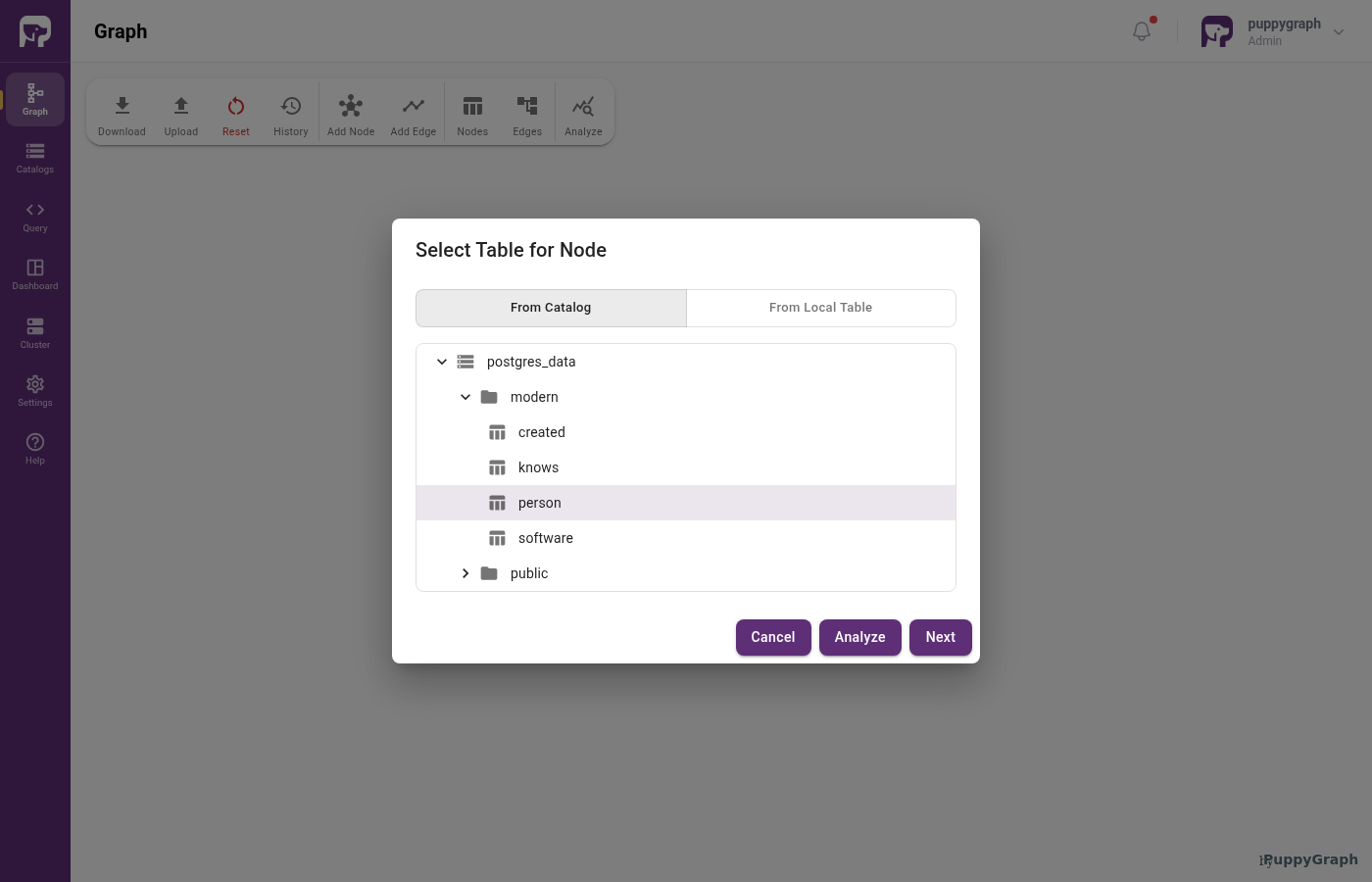
person selectedName the type
Pick a label and optionally a few Cypher type aliases:
| Setting | Value | Notes |
|---|---|---|
| Label | Person |
Used in queries (MATCH (p:Person)) and as the target of edge fromNodeLabel and toNodeLabel. |
| Type aliases | person, human |
Optional. Cypher queries can also match the node by these names. |
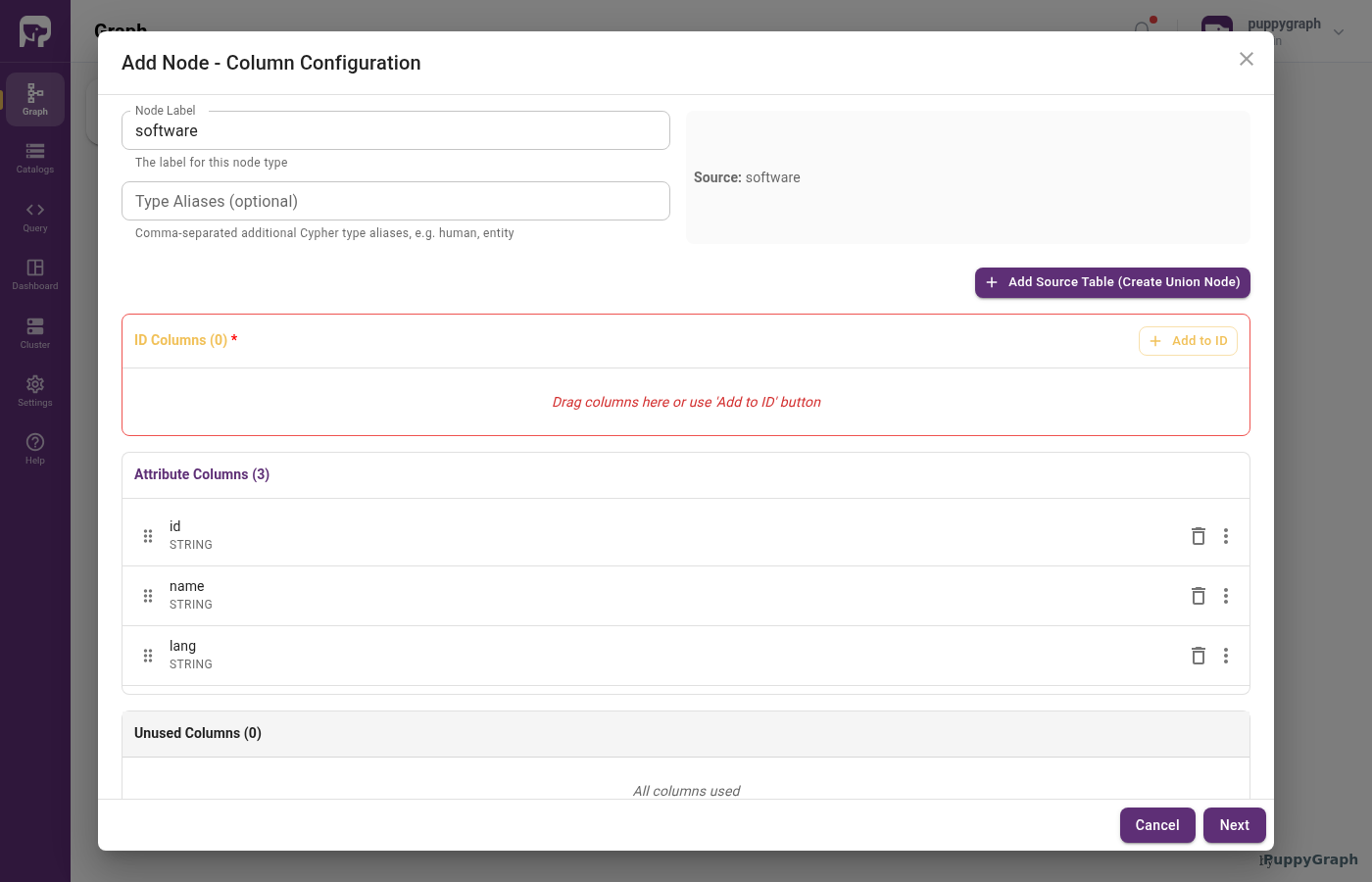
Map columns to node roles
For a node, each column plays one of these roles:
| Role | Description |
|---|---|
| Identifier | Uniquely identifies a node within the type. The combination of identifier columns must be unique. PuppyGraph addresses each node as Type[id1, id2, ...]. Add the same column under attributes if users need to query it as a property. |
| Attribute | Exposed only as a node property in queries (p.name, p.age). |
| Unused | Not represented in the graph. |
For the person table, a typical mapping is:
| Column | Role | Graph type |
|---|---|---|
id |
Identifier | STRING |
name |
Attribute | STRING |
age |
Attribute | INT |
Click Add to ID to move a column into ID Columns and pick from the dropdown. You can also drag a row by its handle between the ID Columns, Attribute Columns, and Unused Columns sections, or use the per-row trash icon to push a column out of its current section. Rename or retype any column inline through the row's three-dot menu.
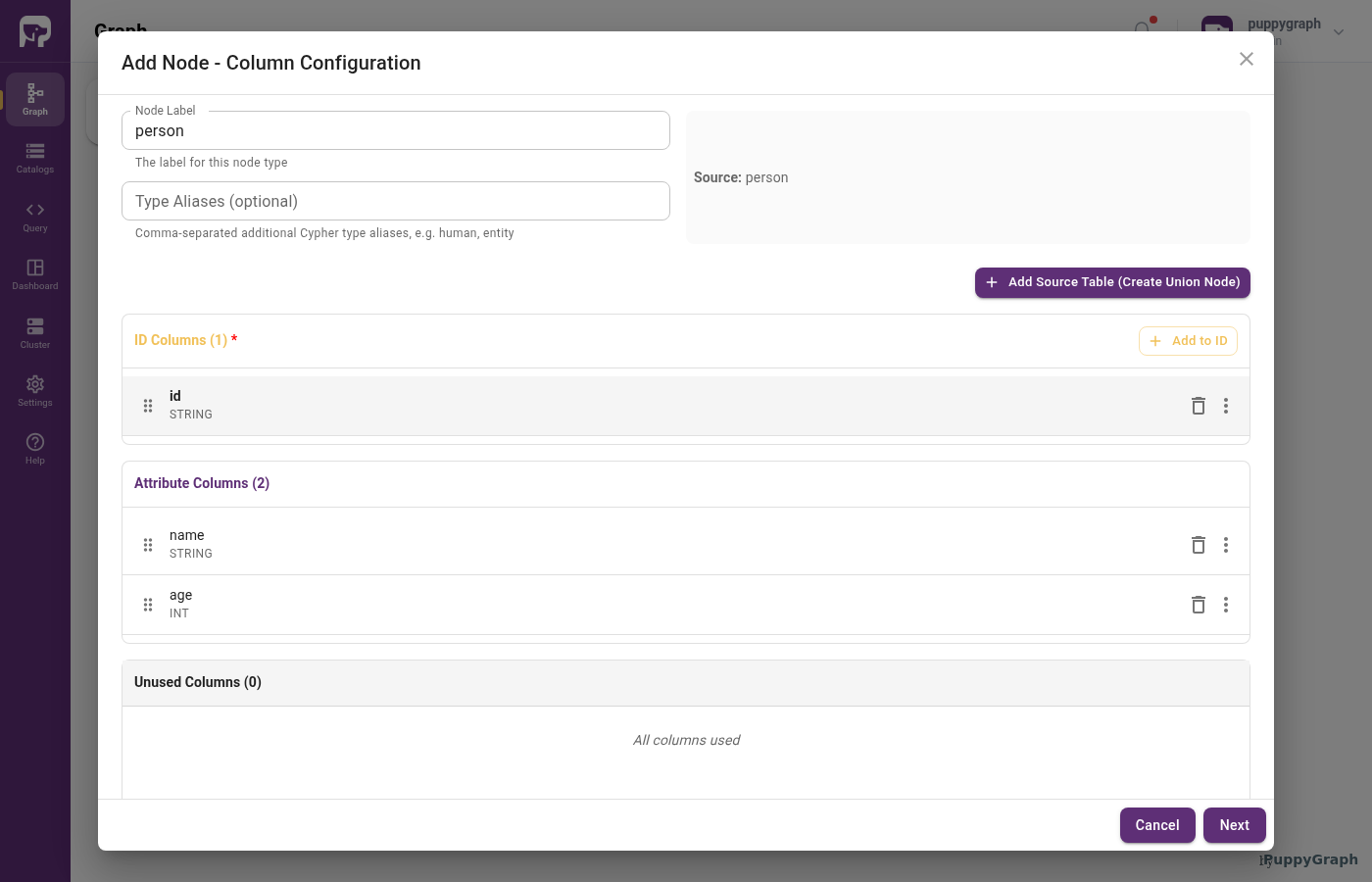
id assigned to ID ColumnsOptionally cache the data locally
For external catalog tables, the Schema Builder offers a second wizard step asking whether to mirror the data into a local table for query-time performance.
Toggle Enable Local Replication to mirror the source table into a PuppyGraph-managed local table. Leave it off to read directly from the external source at query time.
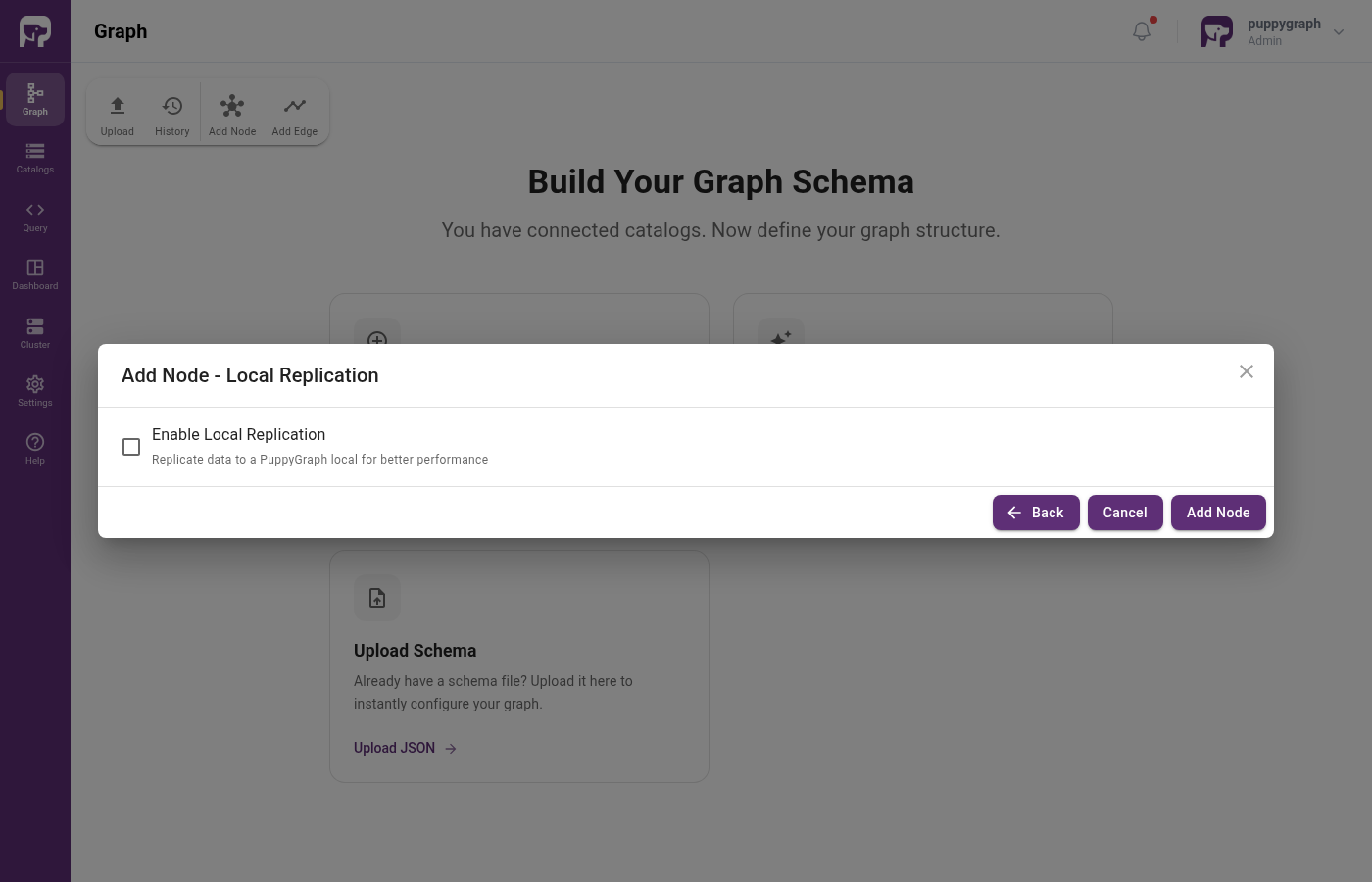
Caching is configured through the localDataSource block on the same dataSourceGroup. See Data Sources and Local Tables.
From a table to an edge
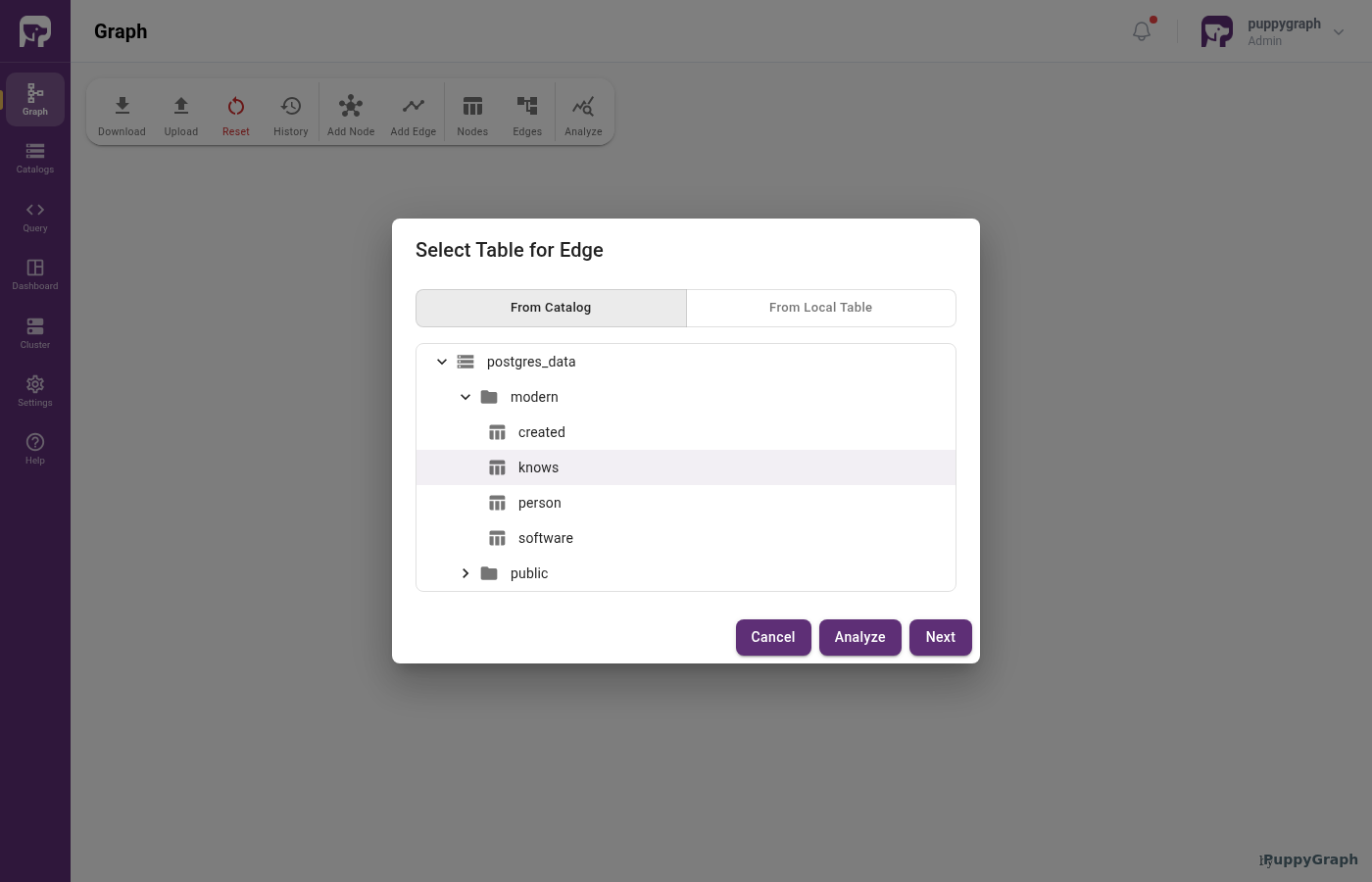
An edge is a typed, directional relationship between two nodes. The mapping extends the node walkthrough with two more decisions: which node types it connects, and which columns hold the foreign keys to those nodes.
Start from a table
Suppose your postgres_data catalog also has a knows table from the modern graph:
| id | from_id | to_id | weight |
|---|---|---|---|
| e7 | v1 | v2 | 0.5 |
| e8 | v1 | v4 | 1.0 |
Connect the node types
Specify which node types this edge connects, and what to call the edge type:
| Setting | Value | Notes |
|---|---|---|
| Label | KNOWS |
Edge type name. |
| From node label | Person |
Label of the source node type. |
| To node label | Person |
Label of the target node type. |
| Type aliases | (optional) | Same as for nodes. |
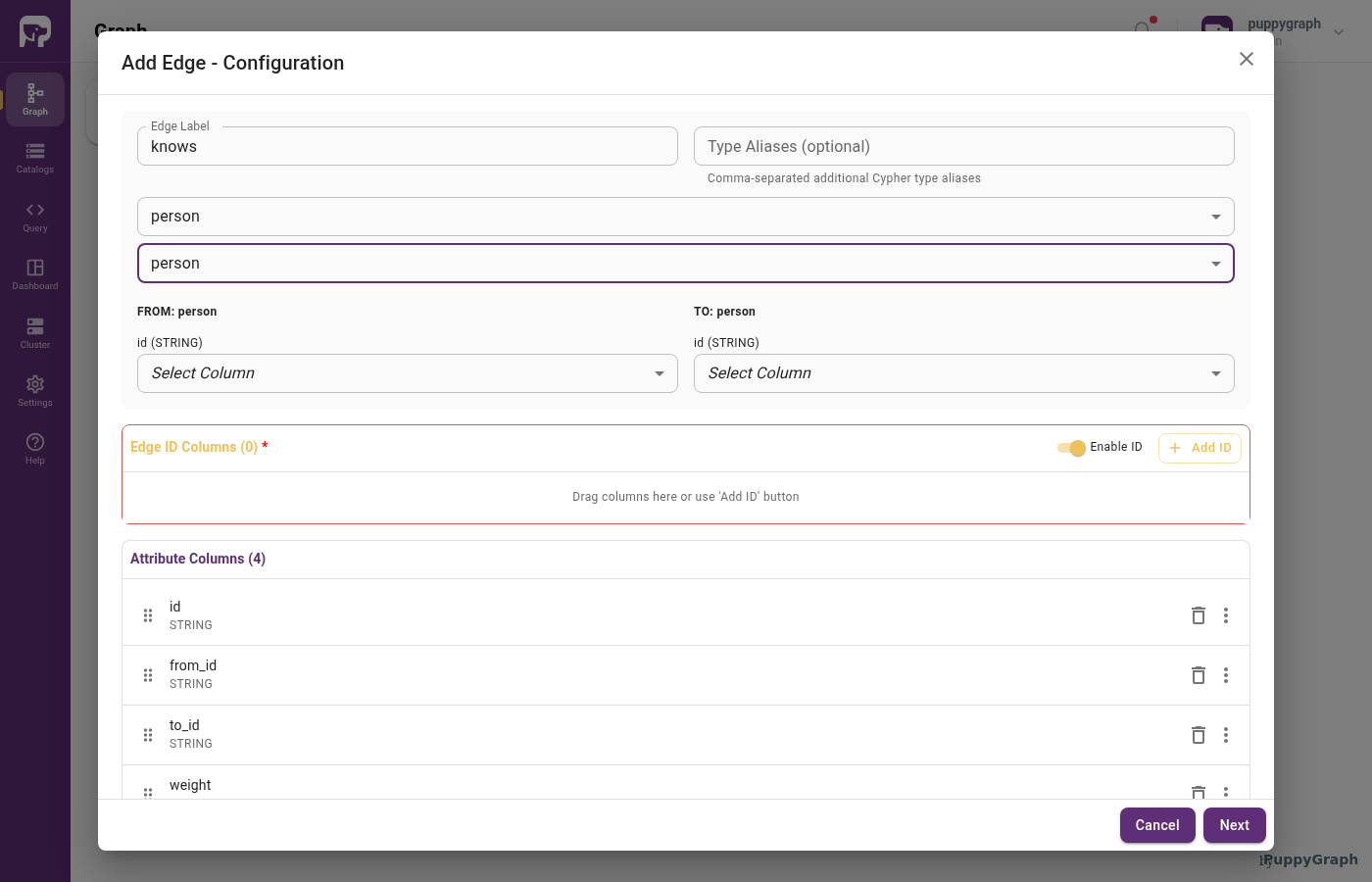
The edge wizard adds From Node and To Node dropdowns alongside the Edge Label field. Picking values reveals matching FROM: and TO: sections lower down, each showing the chosen node's identifier (e.g. id (STRING)) with a Select Column dropdown.
Map columns to edge roles
Edges add two roles to the ones nodes use:
| Role | Description |
|---|---|
| Identifier | Uniquely identifies an edge. Optional. If omitted, PuppyGraph generates one automatically. Add the same column under attributes if users need to query it as a property. |
| From key | Foreign key whose values match the source node's identifier. The column is also added under attribute[] below so it stays queryable as an edge property. |
| To key | Foreign key whose values match the target node's identifier. Like From key, also added under attribute[] so it stays queryable. |
| Attribute | Exposed as an edge property in queries. |
| Unused | Not represented in the graph. |
For the knows table:
| Column | Role | Graph type |
|---|---|---|
id |
Identifier | STRING |
from_id |
From key (also added as Attribute) | STRING |
to_id |
To key (also added as Attribute) | STRING |
weight |
Attribute | DOUBLE |
The number, order, and types of from-key columns must match the source node's identifier columns. Same for to-key and the target.
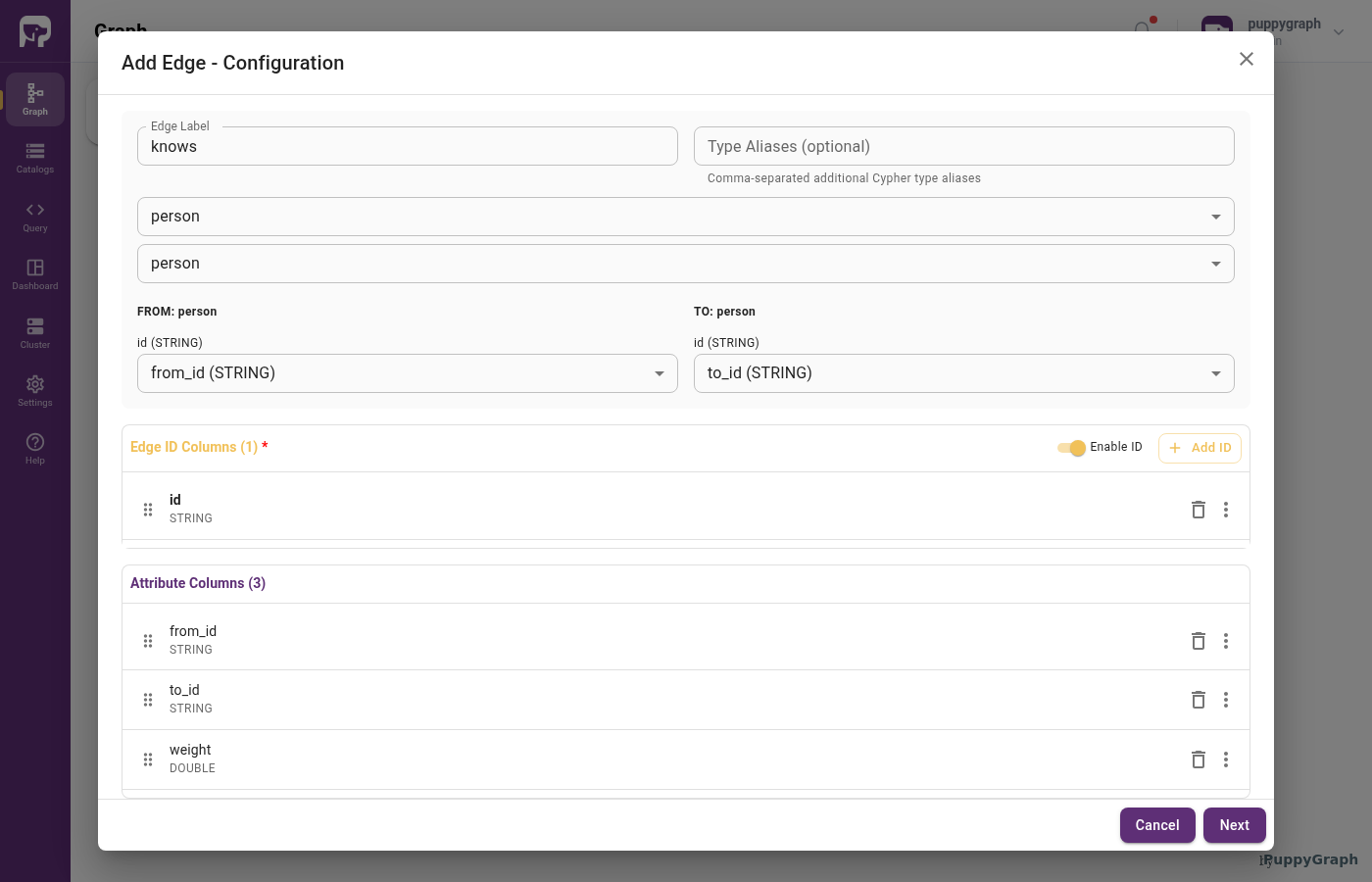
Use the FROM: and TO: sections to pick the source columns that match each side's identifier, one Select Column dropdown per identifier column. Move the edge identifier into Edge ID Columns with Add to ID (or toggle Enable ID off to let PuppyGraph generate one). Remaining columns stay under Attribute Columns as edge properties.
"id":        [{ "name": "id",      "type": "STRING" }],
"fromKey":   [{ "name": "from_id", "type": "STRING" }],
"toKey":     [{ "name": "to_id",   "type": "STRING" }],
"attribute": [
  { "name": "from_id", "type": "STRING" },
  { "name": "to_id",   "type": "STRING" },
  { "name": "weight",  "type": "DOUBLE" }
]
Foreign-key columns appear in both fromKey / toKey and attribute so they remain queryable as edge properties.
Combining multiple tables for one node type
You can map multiple tables onto a single node type. This is useful when:
- A single conceptual node type appears as foreign keys across several tables but has no dedicated table of its own.
- Data for one node type is partitioned across multiple sources you want to query as one.
In the Schema Builder, click Add Source Table (Create Union Node) from the column-configuration step of the Add Node wizard to add another source table to the same type. In JSON, this is configured through unionDataSource on the dataSourceGroup, with an optional dedupKey[] to deduplicate rows that appear in more than one input. See Data Sources and Local Tables for the details.
For example, suppose a Stack Overflow-style dataset has user references in both posts_flat and badges_flat:
| post_id | post_type | owner_user_id | owner_display_name |
|---|---|---|---|
| q1 | question | u1 | Ada |
| a1 | answer | u2 | Byron |
| user_id | display_name | badge_name |
|---|---|---|
| u2 | Byron | Teacher |
| u3 | Cora | Editor |
Model both sources as one User node type:
{
  "label": "User",
  "id": [{ "name": "user_id", "type": "STRING" }],
  "attribute": [{ "name": "display_name", "type": "STRING" }],
  "dataSourceGroup": {
    "unionDataSource": {
      "enabled": true,
      "input": [
        {
          "catalog": "stackoverflow_data",
          "schema": "stackoverflow",
          "table": "posts_flat",
          "mappedField": [
            { "sourceFieldName": "owner_user_id", "targetFieldName": "user_id" },
            {
              "sourceFieldName": "owner_display_name",
              "targetFieldName": "display_name",
              "aggregation": "AGG_ANY_VALUE"
            }
          ]
        },
        {
          "catalog": "stackoverflow_data",
          "schema": "stackoverflow",
          "table": "badges_flat",
          "mappedField": [
            { "sourceFieldName": "user_id", "targetFieldName": "user_id" },
            {
              "sourceFieldName": "display_name",
              "targetFieldName": "display_name",
              "aggregation": "AGG_ANY_VALUE"
            }
          ]
        }
      ],
      "dedupKey": ["user_id"]
    }
  }
}
This schema produces three User nodes:
User["u1"] {display_name: "Ada"}.User["u2"] {display_name: "Byron"}.User["u3"] {display_name: "Cora"}.
The repeated u2 value is deduplicated because user_id is the dedupKey.
Modeling denormalized tables
Denormalized source tables often store several graph concepts in one physical table. A flattened parent row can contain parent properties, copied dimension fields, repeated values, or nested child records. This moves some relationship work upstream into the source table so graph queries can avoid repeatedly reconstructing the same joins at query time.
Schema JSON required
The Web UI for modeling denormalized tables is not ready yet. Author these patterns by editing the graph schema JSON and uploading or importing the updated schema.
Schema fields for denormalized tables
For denormalized tables, the main tools are:
| Field | Use it when |
|---|---|
mappedField |
The source column name differs from the graph field name, or a graph field needs a simple derived value. |
whereClause |
Only some rows in the source table should become a node or edge type. |
unnest |
One source row contains an array or repeated field and should produce one graph row per element. |
ordinalityAlias |
A generated 1-based position from an unnest block is needed, usually to build a stable child ID. |
unionDataSource with dedupKey[] |
A node type is derived from distinct values in one or more source tables instead of a dedicated dimension table. |
enableNullFilter |
A node ID or edge endpoint key can be null and should be filtered automatically. |
mappedField[] maps source fields to graph fields:
"mappedField": [
  { "sourceFieldName": "user_id", "targetFieldName": "id" },
  { "sourceFieldName": "user_country", "targetFieldName": "country" }
]
Identifier fields define graph identity. If users also need to return or filter by an identifier as a graph property, add the same field to attribute[] and map it in mappedField[].
A mappedField[] entry can use sourceExpression instead of sourceFieldName for a simple scalar derived value, such as a generated ID. Prefer sourceFieldName when a source column can be mapped directly.
For unionDataSource, dedupKey[] uses target field names. Non-key fields can specify an aggregation such as AGG_MAX, AGG_MIN, AGG_ANY_VALUE, AGG_SUM, AGG_COUNT, AGG_COUNT_DISTINCT, AGG_ARG_MAX, or AGG_ARG_MIN. AGG_ARG_MAX and AGG_ARG_MIN require argOrderBy.
Use whereClause as a filter expression. Start with comparisons against literal values and combine them with boolean operators only when the graph model needs it.
Recommended starter syntax:
- Column identifiers such as
entity_type,created, orranked. - Literal values: strings in single quotes, numbers,
TRUE, andFALSE. - Comparisons between a column and a literal:
=,!=,<>,<,<=,>, and>=. - Boolean operators:
AND,OR, andNOT. - Parentheses for grouping boolean expressions.
Examples:
post_type = 'question'
score >= 10
post_type = 'question' OR post_type = 'answer'
(post_type = 'question' AND score >= 10) OR owner_user_id = 'u1'
Do not use statement separators, comments, subqueries, joins, data-definition or data-modification statements, set operations, function calls, or arithmetic in whereClause. If a filter needs more complex logic, create a source-side view that exposes the needed filtered rows as a table.
unnest turns an array or repeated field into one graph row per element:
For aligned arrays, put all columns in one unnest block:
"unnest": [
{
"arrayColumn": [
{ "sourceColumn": "answer_ids", "alias": "answer_id" },
{ "sourceColumn": "answer_scores", "alias": "answer_score" }
]
}
]
Only one unnest block is supported per data source. Put multiple aligned arrays inside that one block.
When a child record does not have a natural ID in the source data, add ordinalityAlias to expose the element position from the unnest block. The generated position starts at 1 and can be combined with a parent ID to build a stable synthetic child ID.
The patterns below use one Stack Overflow-style graph with User, Post, Question, Answer, and Tag nodes. The first pattern models posts as a general row-level Post node; later patterns split post rows into Question and Answer nodes. The source tables are simplified samples based on common public Stack Overflow tables such as posts, users, badges, and post links.
Wide fact table
Use this pattern when one flattened table contains an entity, copied dimension fields, and the keys needed to create relationships. For example, posts_flat stores post fields and copied owner fields:
| post_id | post_type | title | owner_user_id | owner_display_name |
|---|---|---|---|---|
| q1 | question | How to model graphs? | u1 | Ada |
| a1 | answer | u2 | Byron |
Model row-level posts with externalDataSource. Each source row becomes one graph element:
{
"label": "Post",
"id": [{ "name": "post_id", "type": "STRING" }],
"attribute": [
{ "name": "post_type", "type": "STRING" },
{ "name": "title", "type": "STRING" }
],
"dataSourceGroup": {
"externalDataSource": {
"enabled": true,
"catalog": "stackoverflow_data",
"schema": "stackoverflow",
"table": "posts_flat",
"mappedField": [
{ "sourceFieldName": "post_id", "targetFieldName": "post_id" },
{ "sourceFieldName": "post_type", "targetFieldName": "post_type" },
{ "sourceFieldName": "title", "targetFieldName": "title" }
]
}
}
}
The copied owner fields can also derive User nodes from distinct source values:
{
"label": "User",
"id": [{ "name": "user_id", "type": "STRING" }],
"attribute": [{ "name": "display_name", "type": "STRING" }],
"dataSourceGroup": {
"unionDataSource": {
"enabled": true,
"input": [
{
"catalog": "stackoverflow_data",
"schema": "stackoverflow",
"table": "posts_flat",
"mappedField": [
{ "sourceFieldName": "owner_user_id", "targetFieldName": "user_id" },
{
"sourceFieldName": "owner_display_name",
"targetFieldName": "display_name",
"aggregation": "AGG_ANY_VALUE"
}
]
}
],
"dedupKey": ["user_id"]
}
}
}
Edges can use the same physical source table and map endpoint keys:
{
"label": "POSTED",
"fromNodeLabel": "User",
"toNodeLabel": "Post",
"fromKey": [{ "name": "user_id", "type": "STRING" }],
"toKey": [{ "name": "post_id", "type": "STRING" }],
"attribute": [
{ "name": "user_id", "type": "STRING" },
{ "name": "post_id", "type": "STRING" },
{ "name": "post_type", "type": "STRING" }
],
"dataSourceGroup": {
"externalDataSource": {
"enabled": true,
"catalog": "stackoverflow_data",
"schema": "stackoverflow",
"table": "posts_flat",
"mappedField": [
{ "sourceFieldName": "owner_user_id", "targetFieldName": "user_id" },
{ "sourceFieldName": "post_id", "targetFieldName": "post_id" },
{ "sourceFieldName": "post_type", "targetFieldName": "post_type" }
]
}
}
}
With the sample rows and snippets above, the graph contains:
Nodes created:
| Node | Properties |
|---|---|
User["u1"] |
display_name: "Ada" |
User["u2"] |
display_name: "Byron" |
Post["q1"] |
post_type: "question", title: "How to model graphs?" |
Post["a1"] |
post_type: "answer", title: "" |
Edges created:
| Edge | Properties |
|---|---|
User["u1"] -[:POSTED]-> Post["q1"] |
user_id: "u1", post_id: "q1", post_type: "question" |
User["u2"] -[:POSTED]-> Post["a1"] |
user_id: "u2", post_id: "a1", post_type: "answer" |
Array many-to-many
Use this pattern when a repeated field represents multiple target nodes or edges. In Stack Overflow data, a question can have multiple tags:
| post_id | post_type | title | tags |
|---|---|---|---|
| q1 | question | How to model graphs? | [graph, schema] |
| q2 | question | How to tune queries? | [query, graph] |
This pattern works best for bounded repeated fields. If one parent row can contain thousands of related entries, consider whether the relationship should stay in a separate source table instead of being modeled from an array on the parent row.
The question row is modeled as a Question node:
{
"label": "Question",
"id": [{ "name": "post_id", "type": "STRING" }],
"attribute": [{ "name": "title", "type": "STRING" }],
"dataSourceGroup": {
"externalDataSource": {
"enabled": true,
"catalog": "stackoverflow_data",
"schema": "stackoverflow",
"table": "posts_flat",
"whereClause": "post_type = 'question'"
}
}
}
If tags are only represented by array values, derive them with unionDataSource, unnest, and dedupKey[]:
{
"label": "Tag",
"id": [{ "name": "tag", "type": "STRING" }],
"dataSourceGroup": {
"unionDataSource": {
"enabled": true,
"input": [
{
"catalog": "stackoverflow_data",
"schema": "stackoverflow",
"table": "posts_flat",
"whereClause": "post_type = 'question'",
"unnest": [
  {
    "arrayColumn": [
      { "sourceColumn": "tags", "alias": "tag" }
    ]
  }
],
"mappedField": [
{ "sourceFieldName": "tag", "targetFieldName": "tag" }
]
}
],
"dedupKey": ["tag"]
}
}
}
Use the same unnest block on the edge:
{
"label": "TAGGED_WITH",
"fromNodeLabel": "Question",
"toNodeLabel": "Tag",
"fromKey": [{ "name": "post_id", "type": "STRING" }],
"toKey": [{ "name": "tag", "type": "STRING" }],
"attribute": [
{ "name": "post_id", "type": "STRING" },
{ "name": "tag", "type": "STRING" }
],
"dataSourceGroup": {
"externalDataSource": {
"enabled": true,
"catalog": "stackoverflow_data",
"schema": "stackoverflow",
"table": "posts_flat",
"whereClause": "post_type = 'question'",
"unnest": [
{
"arrayColumn": [
{ "sourceColumn": "tags", "alias": "tag" }
]
}
],
"mappedField": [
{ "sourceFieldName": "post_id", "targetFieldName": "post_id" },
{ "sourceFieldName": "tag", "targetFieldName": "tag" }
]
}
}
}
With the sample rows and snippets above, the graph contains:
Nodes created:
| Node | Properties |
|---|---|
Question["q1"] |
title: "How to model graphs?" |
Question["q2"] |
title: "How to tune queries?" |
Tag["graph"] |
none |
Tag["schema"] |
none |
Tag["query"] |
none |
Tag graph appears in both source rows but becomes one graph node because tag is the dedupKey.
Edges created:
| Edge | Properties |
|---|---|
Question["q1"] -[:TAGGED_WITH]-> Tag["graph"] |
post_id: "q1", tag: "graph" |
Question["q1"] -[:TAGGED_WITH]-> Tag["schema"] |
post_id: "q1", tag: "schema" |
Question["q2"] -[:TAGGED_WITH]-> Tag["query"] |
post_id: "q2", tag: "query" |
Question["q2"] -[:TAGGED_WITH]-> Tag["graph"] |
post_id: "q2", tag: "graph" |
Nested child records
Use this pattern when a parent row contains aligned arrays or nested repeated fields that represent child entities. For example, a question rollup table can store answer IDs, answer owners, and answer scores on the question parent row:
| question_id | title | answer_ids | answer_owner_user_ids | answer_scores |
|---|---|---|---|---|
| q1 | How to model graphs? | [a1, a2] |
[u2, u3] |
[5, 2] |
| q2 | How to tune queries? | [a3] |
[u1] |
[7] |
Model the parent row as a normal node. For child records stored as aligned arrays, unnest the arrays together so element i from each array produces one child row:
{
"label": "Answer",
"id": [{ "name": "answer_id", "type": "STRING" }],
"attribute": [
{ "name": "owner_user_id", "type": "STRING" },
{ "name": "score", "type": "INT" }
],
"dataSourceGroup": {
"externalDataSource": {
"enabled": true,
"catalog": "stackoverflow_data",
"schema": "stackoverflow",
"table": "question_answer_rollup",
"unnest": [
{
"arrayColumn": [
{ "sourceColumn": "answer_ids", "alias": "answer_id" },
{ "sourceColumn": "answer_owner_user_ids", "alias": "answer_owner_user_id" },
{ "sourceColumn": "answer_scores", "alias": "answer_score" }
]
}
],
"mappedField": [
{ "sourceFieldName": "answer_id", "targetFieldName": "answer_id" },
{ "sourceFieldName": "answer_owner_user_id", "targetFieldName": "owner_user_id" },
{ "sourceFieldName": "answer_score", "targetFieldName": "score" }
]
}
}
}
Edges that point to Answer must use the same unnest aliases:
{
"label": "HAS_ANSWER",
"fromNodeLabel": "Question",
"toNodeLabel": "Answer",
"fromKey": [{ "name": "question_id", "type": "STRING" }],
"toKey": [{ "name": "answer_id", "type": "STRING" }],
"attribute": [
{ "name": "question_id", "type": "STRING" },
{ "name": "answer_id", "type": "STRING" },
{ "name": "score", "type": "INT" }
],
"dataSourceGroup": {
"externalDataSource": {
"enabled": true,
"catalog": "stackoverflow_data",
"schema": "stackoverflow",
"table": "question_answer_rollup",
"unnest": [
  {
    "arrayColumn": [
      { "sourceColumn": "answer_ids", "alias": "answer_id" },
      { "sourceColumn": "answer_scores", "alias": "answer_score" }
    ]
  }
],
"mappedField": [
{ "sourceFieldName": "question_id", "targetFieldName": "question_id" },
{ "sourceFieldName": "answer_id", "targetFieldName": "answer_id" },
{ "sourceFieldName": "answer_score", "targetFieldName": "score" }
]
}
}
}
With the sample rows and schemas above, the graph contains:
Nodes created:
| Node | Properties |
|---|---|
Answer["a1"] |
owner_user_id: "u2", score: 5 |
Answer["a2"] |
owner_user_id: "u3", score: 2 |
Answer["a3"] |
owner_user_id: "u1", score: 7 |
Edges created:
| Edge | Properties |
|---|---|
Question["q1"] -[:HAS_ANSWER]-> Answer["a1"] |
question_id: "q1", answer_id: "a1", score: 5 |
Question["q1"] -[:HAS_ANSWER]-> Answer["a2"] |
question_id: "q1", answer_id: "a2", score: 2 |
Question["q2"] -[:HAS_ANSWER]-> Answer["a3"] |
question_id: "q2", answer_id: "a3", score: 7 |
If the nested child records do not contain answer IDs, use ordinalityAlias to generate a stable child ID from the parent ID and array position:
| question_id | title | answer_owner_user_ids | answer_scores |
|---|---|---|---|
| q1 | How to model graphs? | [u2, u3] |
[5, 2] |
| q2 | How to tune queries? | [u1] |
[7] |
{
  "label": "Answer",
  "id": [{ "name": "answer_id", "type": "STRING" }],
  "attribute": [
    { "name": "owner_user_id", "type": "STRING" },
    { "name": "score", "type": "INT" }
  ],
  "dataSourceGroup": {
    "externalDataSource": {
      "enabled": true,
      "catalog": "stackoverflow_data",
      "schema": "stackoverflow",
      "table": "question_answer_rollup",
      "unnest": [
        {
          "arrayColumn": [
            { "sourceColumn": "answer_owner_user_ids", "alias": "answer_owner_user_id" },
            { "sourceColumn": "answer_scores", "alias": "answer_score" }
          ],
          "ordinalityAlias": "answer_idx"
        }
      ],
      "mappedField": [
        {
          "sourceExpression": "concat(question_id, '-', cast(answer_idx as varchar))",
          "targetFieldName": "answer_id"
        },
        { "sourceFieldName": "answer_owner_user_id", "targetFieldName": "owner_user_id" },
        { "sourceFieldName": "answer_score", "targetFieldName": "score" }
      ]
    }
  }
}
Edges that point to these generated Answer IDs must use the same unnest block and the same ID expression:
{
  "label": "HAS_ANSWER",
  "fromNodeLabel": "Question",
  "toNodeLabel": "Answer",
  "fromKey": [{ "name": "question_id", "type": "STRING" }],
  "toKey": [{ "name": "answer_id", "type": "STRING" }],
  "attribute": [
    { "name": "question_id", "type": "STRING" },
    { "name": "answer_id", "type": "STRING" },
    { "name": "score", "type": "INT" }
  ],
  "dataSourceGroup": {
    "externalDataSource": {
      "enabled": true,
      "catalog": "stackoverflow_data",
      "schema": "stackoverflow",
      "table": "question_answer_rollup",
      "unnest": [
        {
          "arrayColumn": [
            { "sourceColumn": "answer_owner_user_ids", "alias": "answer_owner_user_id" },
            { "sourceColumn": "answer_scores", "alias": "answer_score" }
          ],
          "ordinalityAlias": "answer_idx"
        }
      ],
      "mappedField": [
        { "sourceFieldName": "question_id", "targetFieldName": "question_id" },
        {
          "sourceExpression": "concat(question_id, '-', cast(answer_idx as varchar))",
          "targetFieldName": "answer_id"
        },
        { "sourceFieldName": "answer_score", "targetFieldName": "score" }
      ]
    }
  }
}
With the sample rows above, the graph contains:
Nodes created:
| Node | Properties |
|---|---|
Answer["q1-1"] |
owner_user_id: "u2", score: 5 |
Answer["q1-2"] |
owner_user_id: "u3", score: 2 |
Answer["q2-1"] |
owner_user_id: "u1", score: 7 |
Edges created:
| Edge | Properties |
|---|---|
Question["q1"] -[:HAS_ANSWER]-> Answer["q1-1"] |
question_id: "q1", answer_id: "q1-1", score: 5 |
Question["q1"] -[:HAS_ANSWER]-> Answer["q1-2"] |
question_id: "q1", answer_id: "q1-2", score: 2 |
Question["q2"] -[:HAS_ANSWER]-> Answer["q2-1"] |
question_id: "q2", answer_id: "q2-1", score: 7 |
One table with several node labels
Use this pattern when one table stores several entity types and a discriminator column tells you which rows belong to each graph label.
In the same Stack Overflow-style graph, posts_flat can store both questions and answers:
| post_id | post_type | title | parent_question_id | owner_user_id |
|---|---|---|---|---|
| q1 | question | How to model graphs? | u1 | |
| a1 | answer | q1 | u2 | |
| a2 | answer | q1 | u3 |
Create one node type for each graph label you want to expose:
{
  "label": "Question",
  "dataSourceGroup": {
    "externalDataSource": {
      "enabled": true,
      "catalog": "stackoverflow_data",
      "schema": "stackoverflow",
      "table": "posts_flat",
      "whereClause": "post_type = 'question'"
    }
  },
  "id": [{ "name": "post_id", "type": "STRING" }],
  "attribute": [
    { "name": "post_id", "type": "STRING" },
    { "name": "title", "type": "STRING" },
    { "name": "owner_user_id", "type": "STRING" }
  ]
}
Create a sibling Answer node with whereClause: "post_type = 'answer'", the same post_id identifier, and answer-specific properties such as parent_question_id and owner_user_id.
Graph identity is scoped by node label and identifier. For example, Question["q1"] and Answer["q1"] are different graph nodes even if they read from the same table and use the same source identifier value. Use disjoint whereClause filters when each source row should appear as only one graph label.
Users can then query each category by graph label:
With the sample rows and sibling node entries described above, the graph contains:
Nodes created:
| Node | Properties |
|---|---|
Question["q1"] |
post_id: "q1", title: "How to model graphs?", owner_user_id: "u1" |
Answer["a1"] |
parent_question_id: "q1", owner_user_id: "u2" |
Answer["a2"] |
parent_question_id: "q1", owner_user_id: "u3" |
Each node reads from the same physical table, but each label only sees rows selected by its own whereClause.
Use one node type with the discriminator as a property when all rows have the same graph behavior and users only need to filter by category in queries.
Column types
Identifier and property columns share a small JSON shape: a name, a type, and an optional auto-increment flag.
| Type | Description |
|---|---|
STRING |
UTF-8 string. |
INT |
32-bit signed integer. |
LONG |
64-bit signed integer. |
DOUBLE |
64-bit IEEE 754 floating point. |
BOOLEAN |
True or false. |
DATE |
Calendar date with no time component. |
DATETIME |
Date and time. |
The auto_increment flag is used on local-table columns that should be auto-generated, typically as default edge IDs.