Querying OneLake Data as a Graph
Summary
In this tutorial, you will:
- Create a lakehouse in Microsoft OneLake and load example data.
- Start a PuppyGraph container and connect it to OneLake through the OneLake table APIs for Iceberg.
- Run Cypher and Gremlin queries against the OneLake data as a graph.
Requires a Microsoft Fabric workspace
PuppyGraph reads OneLake through the AWS-compatible Iceberg REST endpoint that Microsoft exposes. The Delta tables you create in the Fabric workspace are virtualized to Iceberg automatically; the PuppyGraph container needs a service-principal client ID + secret with read access to the lakehouse. See Connecting to Iceberg for the catalog reference.
Prerequisites
dockeris available on the host where you'll run PuppyGraph.- A Microsoft Fabric workspace and a user account with at least the Contributor role on that workspace.
- A service principal in Microsoft Entra ID with permission to read tables in the lakehouse. See preparing for authentication.
Recommended reading:
- OneLake table API overview
- OneLake table APIs for Iceberg
- Getting started with OneLake table APIs for Iceberg
- Use Iceberg tables with OneLake
Setup
Data Preparation
 Turn on Delta-to-Iceberg virtualization for your workspace (workspace settings → Enable Delta Lake to Apache Iceberg table format virtualization).
Create a schema-enabled lakehouse in your Fabric workspace, then create a notebook with Spark SQL as the language and run:
modern.sql
CREATE SCHEMA modern;

CREATE TABLE modern.person (
  id   string,
  name string,
  age  int
) USING DELTA;
INSERT INTO modern.person VALUES
  ('v1', 'marko', 29),
  ('v2', 'vadas', 27),
  ('v4', 'josh',  32),
  ('v6', 'peter', 35);

CREATE TABLE modern.software (
  id   string,
  name string,
  lang string
) USING DELTA;
INSERT INTO modern.software VALUES
  ('v3', 'lop',    'java'),
  ('v5', 'ripple', 'java');

CREATE TABLE modern.created (
  id      string,
  from_id string,
  to_id   string,
  weight  double
) USING DELTA;
INSERT INTO modern.created VALUES
  ('e9',  'v1', 'v3', 0.4),
  ('e10', 'v4', 'v5', 1.0),
  ('e11', 'v4', 'v3', 0.4),
  ('e12', 'v6', 'v3', 0.2);

CREATE TABLE modern.knows (
  id      string,
  from_id string,
  to_id   string,
  weight  double
) USING DELTA;
INSERT INTO modern.knows VALUES
  ('e7', 'v1', 'v2', 0.5),
  ('e8', 'v1', 'v4', 1.0);
Confirm that each Delta table has been virtualized to Iceberg by inspecting the table folder (see virtualizing Delta Lake tables as Iceberg).
| id | name | age |
|---|---|---|
| v1 | marko | 29 |
| v2 | vadas | 27 |
| v4 | josh | 32 |
| v6 | peter | 35 |
| id | name | lang |
|---|---|---|
| v3 | lop | java |
| v5 | ripple | java |
| id | from_id | to_id | weight |
|---|---|---|---|
| e9 | v1 | v3 | 0.4 |
| e10 | v4 | v5 | 1.0 |
| e11 | v4 | v3 | 0.4 |
| e12 | v6 | v3 | 0.2 |
| id | from_id | to_id | weight |
|---|---|---|---|
| e7 | v1 | v2 | 0.5 |
| e8 | v1 | v4 | 1.0 |
Start PuppyGraph
Start the PuppyGraph container:
docker run -d --name puppygraph \
  -p 8081:8081 -p 8182:8182 -p 7687:7687 \
  -e PUPPYGRAPH_USERNAME=puppygraph \
  -e PUPPYGRAPH_PASSWORD=puppygraph123 \
  --pull=always puppygraph/puppygraph:latest
Default password
Change PUPPYGRAPH_PASSWORD before running on a publicly accessible machine.
Modeling a Graph
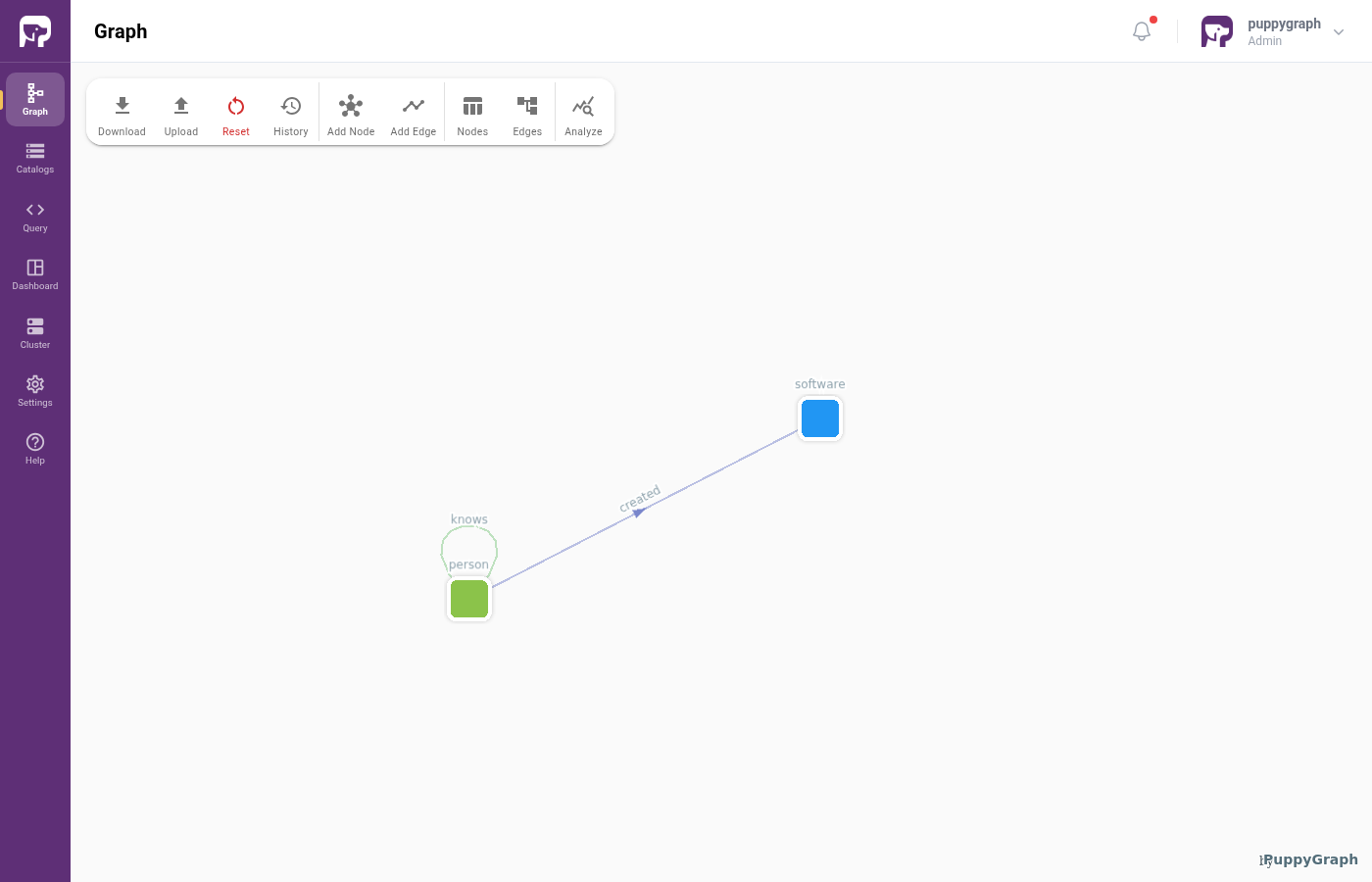
We model the data as the TinkerPop modern graph: two node types (person, software) and two edge types (knows, created).
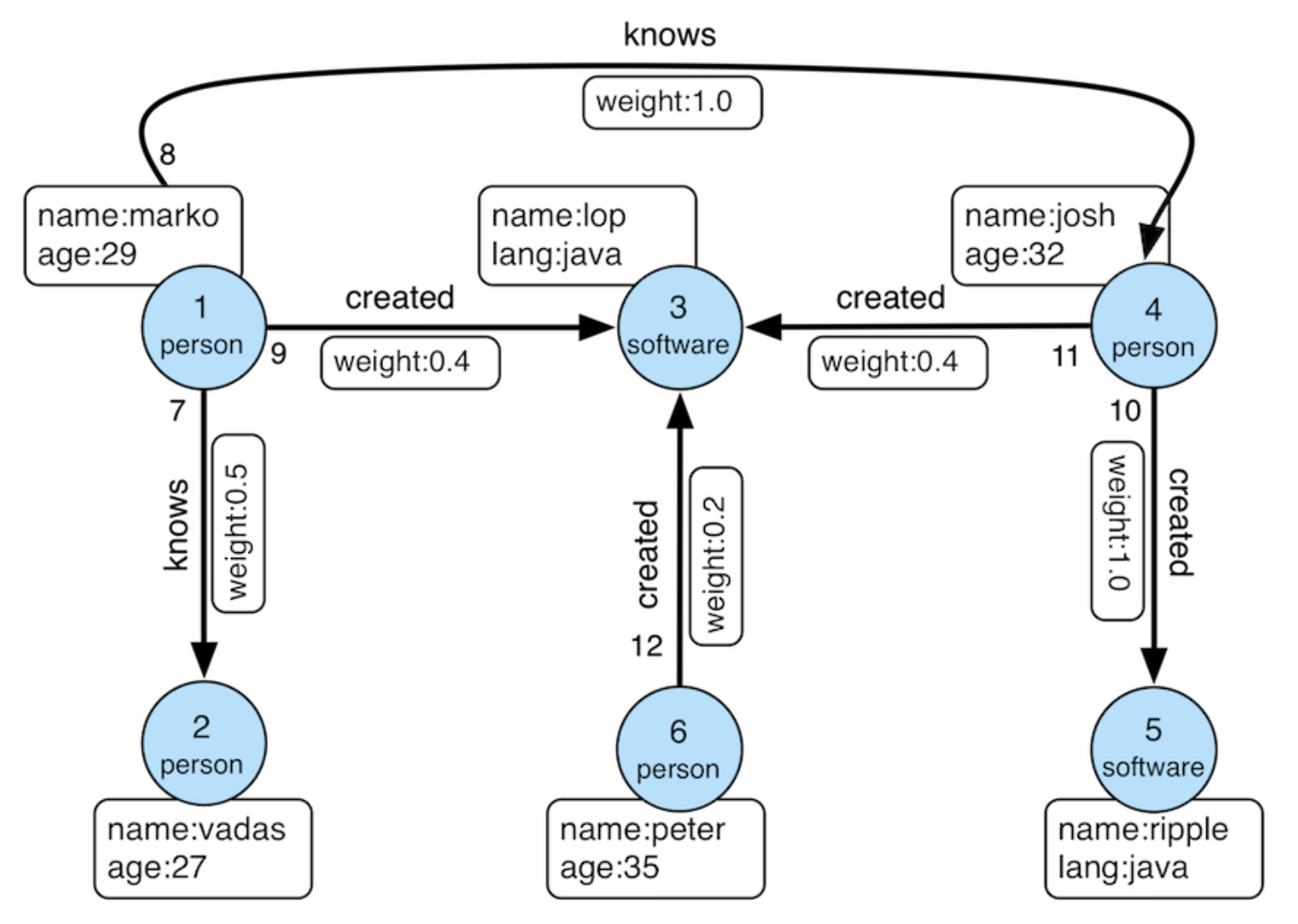
Log into the PuppyGraph Web UI at http://localhost:8081 with puppygraph / puppygraph123.
Build the graph in the Schema Builder
Click Create Catalog, then expand Data Lakes and pick Apache Iceberg.
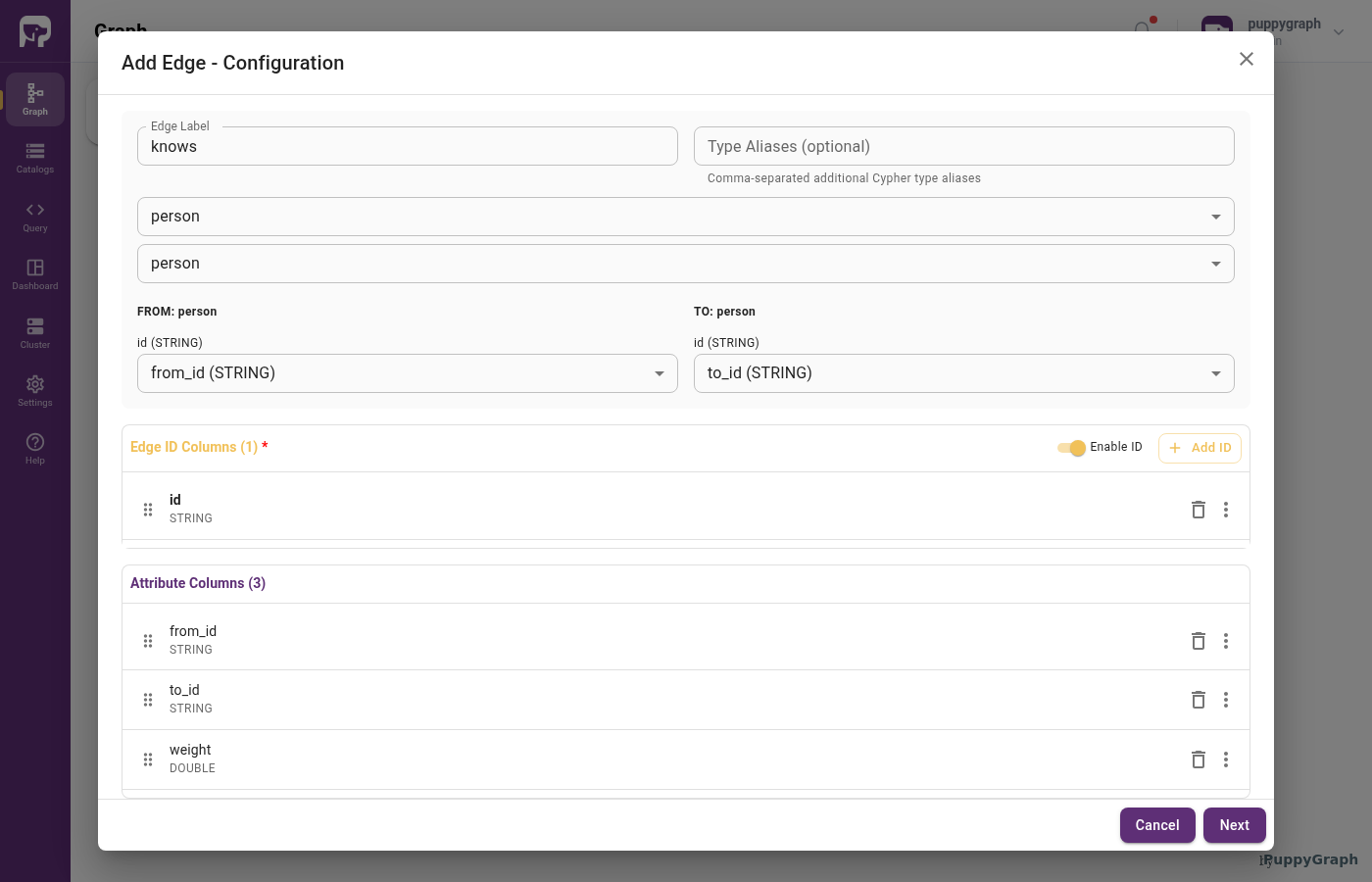
Fill in the connection form. The endpoint is the OneLake Iceberg REST URI; the warehouse identifier is <workspace_id>/<lakehouse_id>:
| Field | Value |
|---|---|
| Catalog name | onelake_data |
| Metastore type | Iceberg REST |
| REST Endpoint URL | https://onelake.table.fabric.microsoft.com/iceberg |
| REST Warehouse | <workspace_id>/<lakehouse_id> |
| Authentication Type | OAuth 2.0 Client Credentials |
| OAuth 2.0 Credential | <client_id>:<client_secret> |
| OAuth 2.0 Scope | https://storage.azure.com/.default |
| OAuth 2.0 Server URI | https://login.microsoftonline.com/<tenant_id>/oauth2/v2.0/token |
| Storage type | Azure Data Lake Storage Gen2 |
| Storage authentication | Service Principal |
| Client ID | <client_id> |
| Client Secret | <client_secret> |
| Client Endpoint | https://login.microsoftonline.com/<tenant_id>/oauth2/v2.0/token |
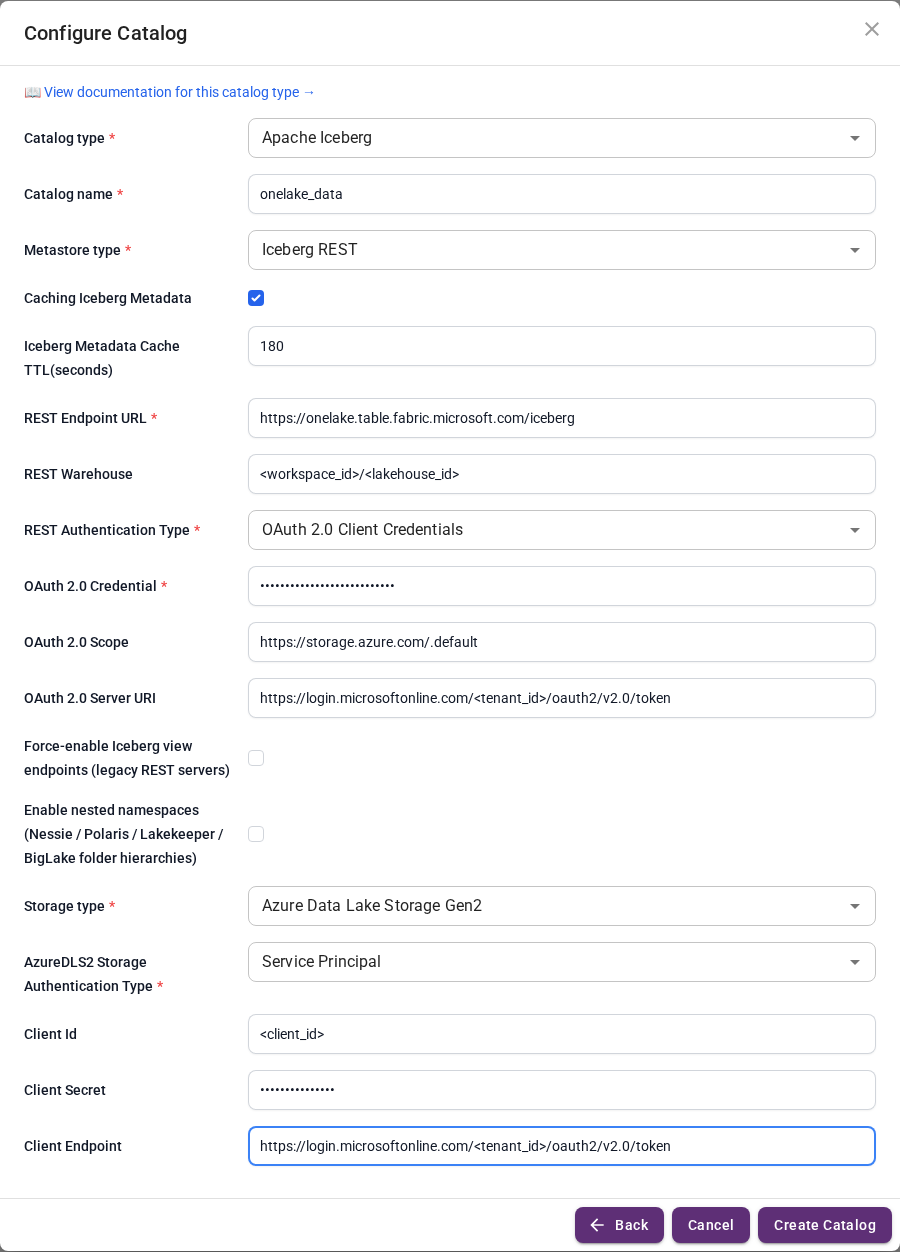
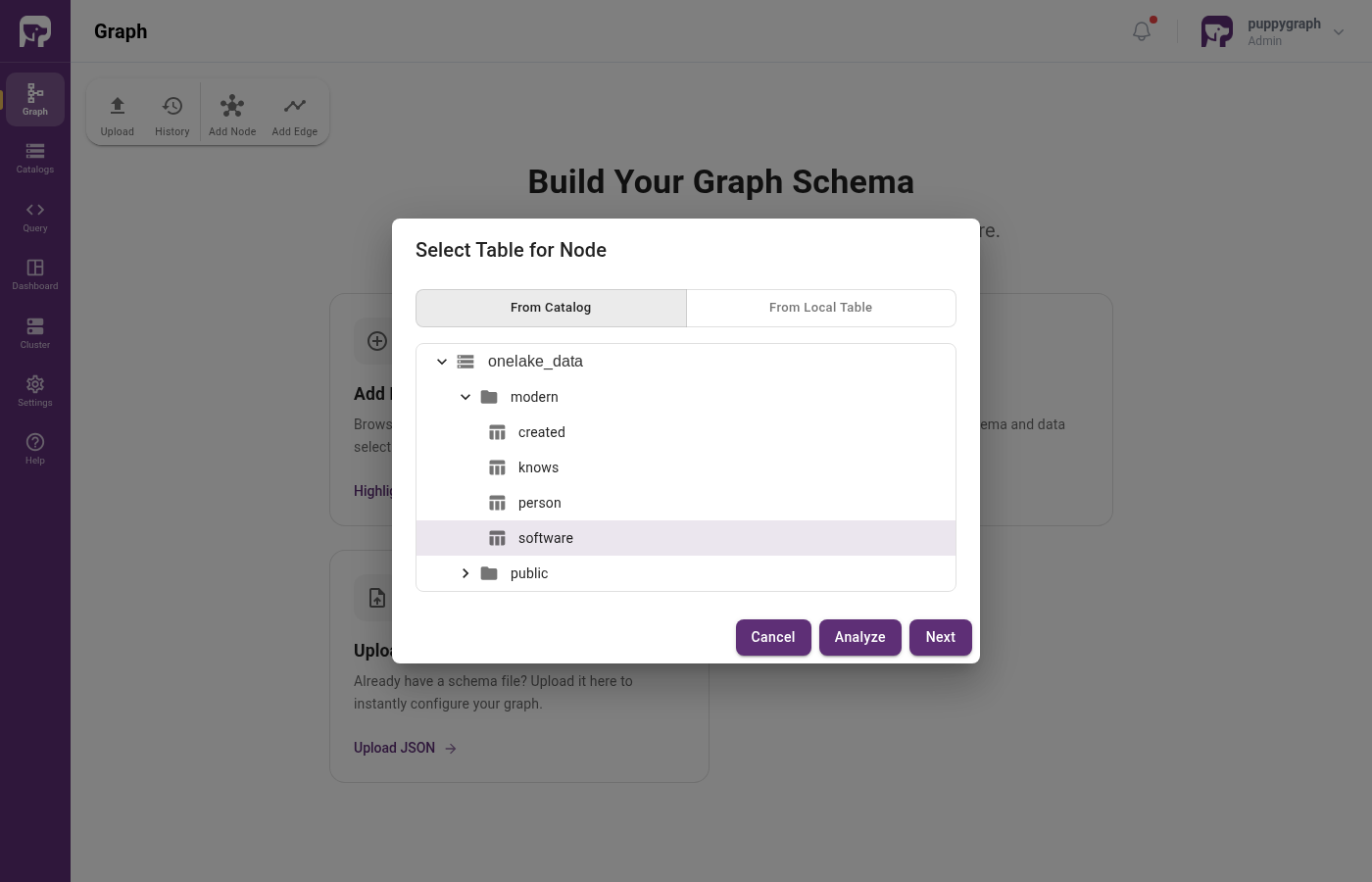
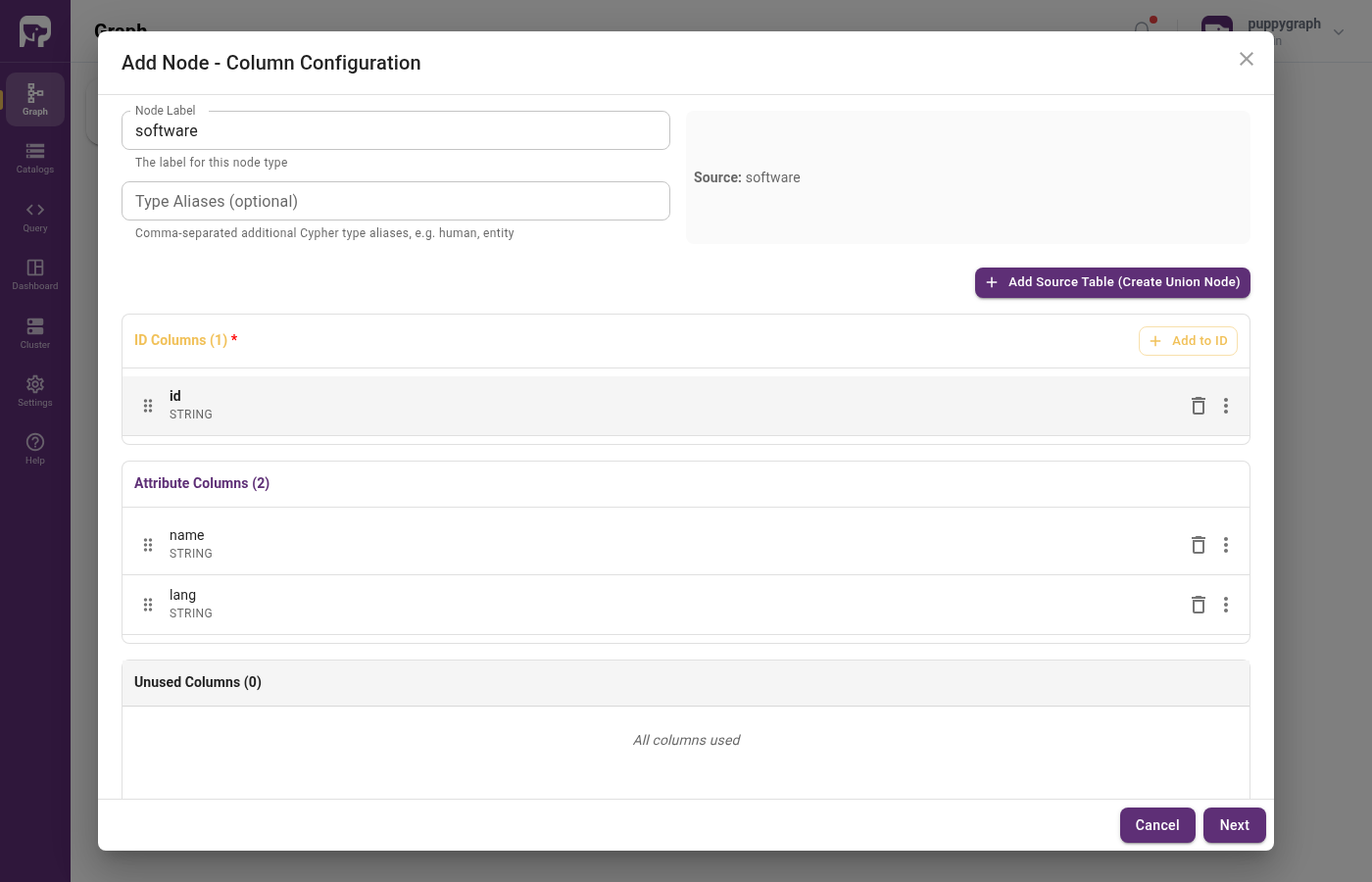
Click Create Catalog, then add the person / software nodes and created / knows edges.
Upload a schema file
Create a file schema.json with the following content. Fill in the placeholders from your Fabric workspace and Entra ID service principal:
| Placeholder | Description |
|---|---|
<workspace_id> |
The ID of your Microsoft Fabric workspace |
<lakehouse_id> |
The ID of the lakehouse data item |
<client_id> |
Client ID of the service principal |
<client_secret> |
Client secret of the service principal |
<tenant_id> |
Entra ID tenant ID |
schema.json
{
  "catalog": [
    {
      "name": "onelake_data",
      "type": "iceberg",
      "metastore": {
        "type": "rest",
        "uri": "https://onelake.table.fabric.microsoft.com/iceberg",
        "warehouse": "<workspace_id>/<lakehouse_id>",
        "security": "oauth2",
        "credential": "<client_id>:<client_secret>",
        "scope": "https://storage.azure.com/.default",
        "oauthServerUri": "https://login.microsoftonline.com/<tenant_id>/oauth2/v2.0/token"
      },
      "storage": {
        "type": "AzureDLS2",
        "clientId": "<client_id>",
        "clientSecret": "<client_secret>",
        "clientEndpoint": "https://login.microsoftonline.com/<tenant_id>/oauth2/v2.0/token"
      }
    }
  ],
  "node": [
    {
      "label": "software",
      "dataSourceGroup": {
        "externalDataSource": {
          "enabled": true,
          "catalog": "onelake_data",
          "schema": "modern",
          "table": "software",
          "mappedField": [
            { "sourceFieldName": "id",   "targetFieldName": "id"   },
            { "sourceFieldName": "name", "targetFieldName": "name" },
            { "sourceFieldName": "lang", "targetFieldName": "lang" }
          ]
        }
      },
      "id":        [{ "name": "id",   "type": "STRING" }],
      "attribute": [
        { "name": "name", "type": "STRING" },
        { "name": "lang", "type": "STRING" }
      ]
    },
    {
      "label": "person",
      "dataSourceGroup": {
        "externalDataSource": {
          "enabled": true,
          "catalog": "onelake_data",
          "schema": "modern",
          "table": "person",
          "mappedField": [
            { "sourceFieldName": "id",   "targetFieldName": "id"   },
            { "sourceFieldName": "name", "targetFieldName": "name" },
            { "sourceFieldName": "age",  "targetFieldName": "age"  }
          ]
        }
      },
      "id":        [{ "name": "id",   "type": "STRING" }],
      "attribute": [
        { "name": "name", "type": "STRING" },
        { "name": "age",  "type": "INT"    }
      ]
    }
  ],
  "edge": [
    {
      "label":         "created",
      "fromNodeLabel": "person",
      "toNodeLabel":   "software",
      "dataSourceGroup": {
        "externalDataSource": {
          "enabled": true,
          "catalog": "onelake_data",
          "schema": "modern",
          "table": "created",
          "mappedField": [
            { "sourceFieldName": "id",      "targetFieldName": "id"      },
            { "sourceFieldName": "from_id", "targetFieldName": "from_id" },
            { "sourceFieldName": "to_id",   "targetFieldName": "to_id"   },
            { "sourceFieldName": "weight",  "targetFieldName": "weight"  }
          ]
        }
      },
      "id":        [{ "name": "id",      "type": "STRING" }],
      "fromKey":   [{ "name": "from_id", "type": "STRING" }],
      "toKey":     [{ "name": "to_id",   "type": "STRING" }],
      "attribute": [
        { "name": "from_id", "type": "STRING" },
        { "name": "to_id",   "type": "STRING" },
        { "name": "weight",  "type": "DOUBLE" }
      ]
    },
    {
      "label":         "knows",
      "fromNodeLabel": "person",
      "toNodeLabel":   "person",
      "dataSourceGroup": {
        "externalDataSource": {
          "enabled": true,
          "catalog": "onelake_data",
          "schema": "modern",
          "table": "knows",
          "mappedField": [
            { "sourceFieldName": "id",      "targetFieldName": "id"      },
            { "sourceFieldName": "from_id", "targetFieldName": "from_id" },
            { "sourceFieldName": "to_id",   "targetFieldName": "to_id"   },
            { "sourceFieldName": "weight",  "targetFieldName": "weight"  }
          ]
        }
      },
      "id":        [{ "name": "id",      "type": "STRING" }],
      "fromKey":   [{ "name": "from_id", "type": "STRING" }],
      "toKey":     [{ "name": "to_id",   "type": "STRING" }],
      "attribute": [
        { "name": "from_id", "type": "STRING" },
        { "name": "to_id",   "type": "STRING" },
        { "name": "weight",  "type": "DOUBLE" }
      ]
    }
  ]
}
In the Web UI, click Graph in the sidebar, then Upload Schema, and select schema.json.
Upload via CLI
Querying the Graph
In the PuppyGraph Web UI, click Query in the sidebar. You can run graph queries in either Cypher or Gremlin.
The following query answers "What software was created by people that marko knows?"
Cleanup
Stop the PuppyGraph container:
Drop the demo tables and the lakehouse from your Fabric workspace when you're done.